Stop over-engineering your n8n RAG pipeline before you've shipped anything
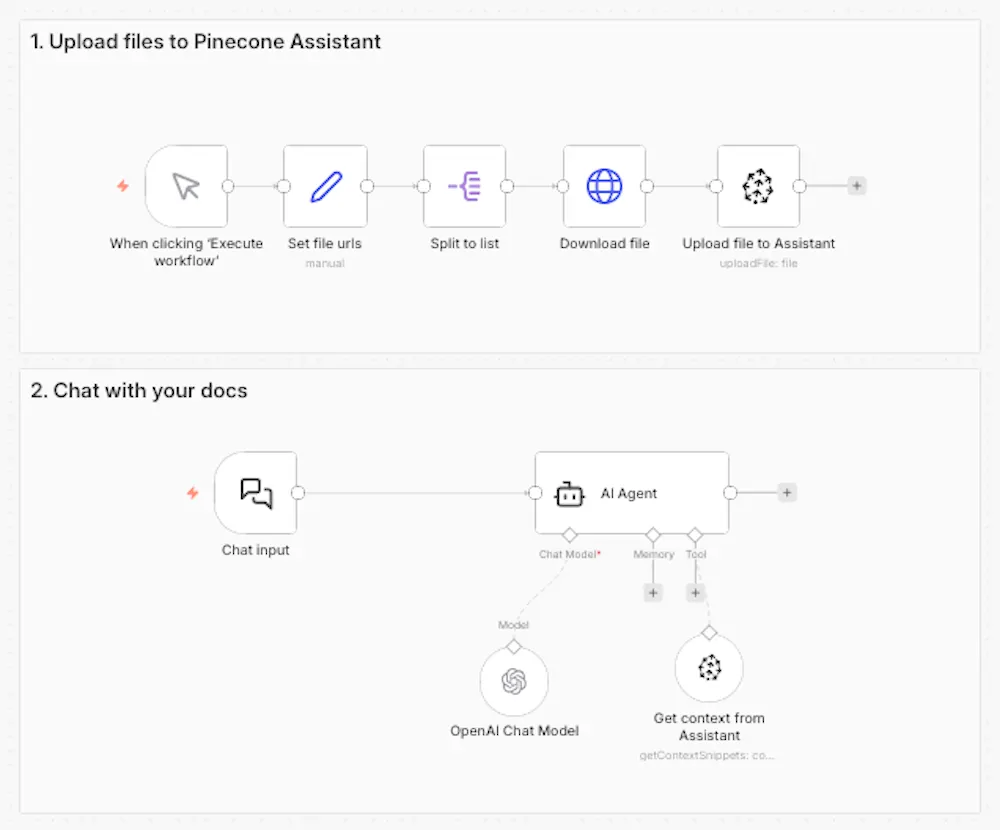
When building RAG workflows in n8n, you have two primary options for working with Pinecone: the Pinecone Assistant node and the Pinecone Vector Store node.
I see this pattern a lot in n8n: a developer sets out to build a RAG-powered feature and ends up three days deep configuring (and reconfiguring) text splitters, embedding models, rerankers, and debugging — without a working system to show for it.
It's a real productivity trap, and it's partly an artifact of how RAG is usually taught. Most tutorials step through the full pipeline from scratch: load documents, split them, embed them, store them, retrieve them, rerank them, generate. You internalize the idea that understanding and owning each step is the price of admission.
For learning, that's fine. For shipping, it's often the wrong starting point.
Two n8n nodes, two different commitments
When building RAG workflows in n8n, you have two primary options for working with Pinecone:
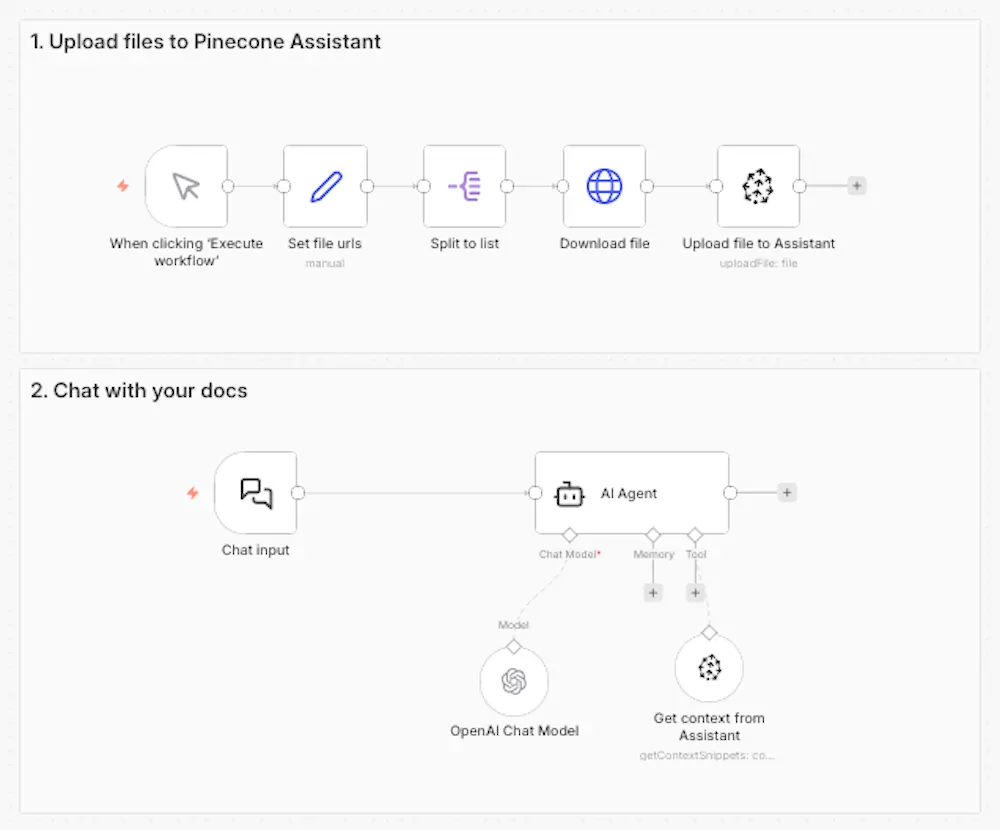
The Pinecone Assistant node is a managed RAG pipeline. You add documents to an Assistant, and Pinecone handles chunking, embedding, query planning, semantic search, and reranking automatically. In your workflow, you work with a single node. The pipeline decisions are made for you — based on Pinecone's retrieval best practices — and they update automatically as the Assistant product improves.
The Pinecone Vector Store node gives you direct access to the vector database. You build the pipeline yourself: choose your chunking strategy, choose your embedding model, implement your search approach, add a reranker if you need one. You control every variable. You also debug every failure.
Neither node is inherently better. They represent different tradeoffs, and the right choice depends on what you're actually building — not on which gives you more control.
The bias toward complexity
I think engineers are often drawn to the option with more control — I've felt this pull myself, often out of curiosity of "how does this thing really work?" But here's the thing: it makes sense in systems where the details of implementation create meaningful product differentiation. It makes less sense in systems where the infrastructure is not the product.
For most RAG applications, the retrieval pipeline is not the product. It's the thing that enables the product. A customer support chatbot, an internal knowledge base, a documentation search tool — these applications succeed or fail based on how well they serve users, not based on which chunking algorithm was used under the hood.
When the retrieval pipeline becomes a thing you maintain, tune, and debug continuously, it consumes engineering attention that could go toward the features users actually see. The Pinecone Assistant node is designed to prevent that: managed retrieval as a building block, not a maintenance burden.
When the details actually matter
There are real scenarios where custom pipeline control earns its complexity. The Vector Store node is the right choice when:
Your content has specialized retrieval requirements. Legal documents often require clause-level chunking precision that generic strategies miss. Technical documentation with code snippets may need language-aware processing. Multilingual content benefits from language-specific embedding models. If your content type has characteristics that standard chunking handles poorly, you need access to those controls.
You require a specific embedding model. Fine-tuned models trained on domain-specific data, models required for compliance or data residency reasons, or embedding models that outperform defaults for your specific content type — these are legitimate reasons to own the embedding step.
You're implementing advanced retrieval techniques. Hybrid search (combining vector search with keyword search), multi-stage retrieval with custom reranking, or metadata-heavy filtering strategies all require direct access to the vector store layer.
The common thread in all three scenarios: the pipeline detail creates a specific, nameable improvement in retrieval quality or system behavior. That's what I check for before reaching for the Vector Store node.
A practical decision framework
Before choosing, I'd ask one question: what specific user-facing outcome requires custom control over this pipeline step?
If the answer is concrete — "I'm building a legal document search tool where missed clauses have real downstream consequences" — Pinecone Vector Store is worth the investment. If the answer is vague — "I might need more flexibility later" or "I want to understand how it works" — that's not a product requirement, it's technical curiosity. Ship with the Assistant node and revisit when you hit an actual limitation.
The mental shift is from "how do I build this?" to "what am I building?" The Assistant node enables that shift by removing the infrastructure layer as an ongoing concern. When retrieval becomes a managed building block, the interesting engineering work moves up the stack — to routing logic, to evaluation, to the product features that actually differentiate what you're making.
My practical recommendation
For most n8n builders starting a RAG project, I recommend beginning with the Pinecone Assistant node. It handles the pipeline decisions competently, keeps your workflow readable, and gets you to a working system quickly. You can always migrate to a custom pipeline when you identify a specific reason to do so — and that reason will be clearer once you've shipped something and seen where the actual friction is.
Complexity is easy to add later, but you can't get back the time you spend on premature optimization.
Try it out for yourself
Try out the Assistant node with this quickstart or use one of these n8n workflow templates I built to get ideas.