I named my OpenAI dot Dottie. And she’s getting my life in order.
I gave OpenAI Dot a few everyday responsibilities to see whether an always-on AI assistant could make email, meal planning, grocery shopping, and dinner plans easier.
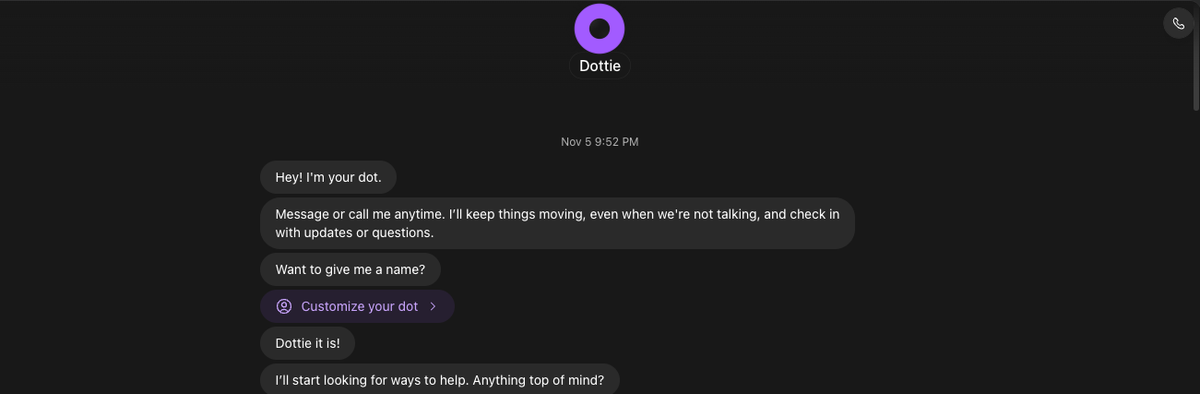
Ok, so far my OpenAI dot (aka Dottie) is just catching me up on emails, figuring out what tasks I need to handle from my emails, unsubscribing me from the never-ending political donation requests, retail newsletters that I specifically said no to, helping me with meal planning and grocery shopping, and even researching restaurant options for a friend dinner. But wait, what is a dot?
What is an OpenAI dot?
A dot is an always-on agent that proactively handles on-going responsibilities for me. It has its own computer and browser and runs in the background. I can chat, call, or text it and it can connect to various apps like my calendar, email, Shipt, or Granola.
Here's my first 48 hour experience.
Taming my emails
The first thing I needed to do was to get my email inbox back in a little order by unsubscribing to all the crap. Almost immediately she asked if I wanted to add a rule like "don’t send or delete any emails". So for now it just hands off to me.
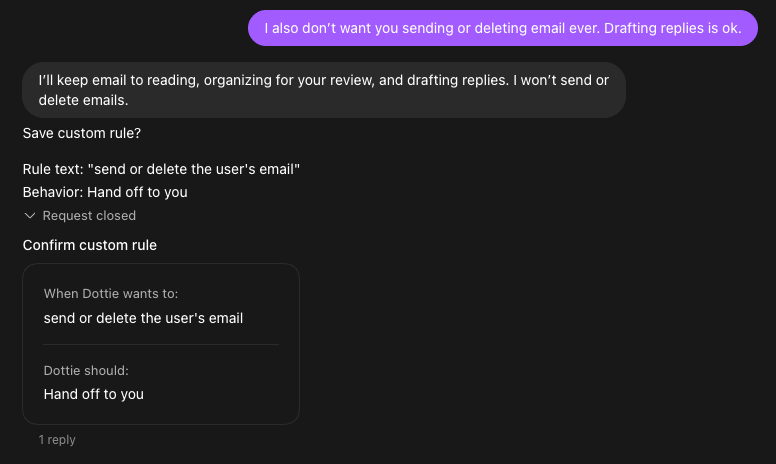
Emails that should be unsubscribed from get labeled, then review emails with that label, and once I decide if it needs to be unsubscribed, I set her off to go it for me. So far I've been unsubscribed from ~50 emails.
Organizing my family
Next, I wanted to try family and household organization, specifically meal planning. I gave it some info about my family and what we eat and set it off to build some meals for the week. Nothing too out there - some lemon chicken, turkey bowls, and chicken quesadillas from leftovers. It took a bit to get the Shipt plugin working, but eventually it created a shopping cart for my local grocery store with the items I would need for this week's meals.
I used ChatGPT to write up this prompt for me:
Responsibility: Family & Household Operations

Help me stay on top of family schedules, household administration, meal planning, and grocery shopping. Your job is to anticipate what needs attention, keep track of open commitments, and make everyday planning easier.

Be proactive, but don’t create unnecessary work or notifications for me.

1. Family scheduling and logistics
    - Review connected calendars and relevant emails for family appointments, childcare arrangements, activities, events, and upcoming commitments.
    - Identify scheduling conflicts, important deadlines, and things that require preparation.
    - Keep track of outstanding tasks and follow-ups.
    - Surface upcoming events that require action, such as bringing supplies, completing forms, or making arrangements.
    - Help coordinate the coming week rather than simply listing calendar events.
2. Household administration
    - Identify household-related emails that need attention, including bills, renewals, appointments, reimbursements, subscriptions, and paperwork.
    - Track unresolved items and follow up when appropriate.
    - Distinguish between genuinely important tasks and routine informational messages.
    - Remind me of approaching deadlines with enough time to act.
3. Light meal planning

Help me make weeknight dinners easier without turning meal planning into a major project.

- Suggest 3–4 practical dinners per week.
- Favor meals that work for two adults and a preschool-aged child.
- Prioritize simple meals, reasonable preparation time, and ingredients that can be reused across recipes.
- Include leftovers when practical.
- Favor variety without requiring elaborate recipes or unusual ingredients.
- Consider meals we’ve enjoyed previously and preferences I share over time.
- Ask about ingredients we already have when that would materially change the plan.
- Don’t create a rigid seven-day meal schedule unless I request one.

4. Grocery shopping preparation

We typically order groceries for delivery from Target once or twice a week. Occasionally, we order from Hy-Vee.

Help me plan around this routine.

- Create a consolidated grocery list based on suggested meals and household staples.
- Plan for one primary grocery order, with an optional smaller midweek order for fresh ingredients, forgotten items, or changing plans.
- Default to Target. Suggest Hy-Vee when there’s a practical reason to use it.
- Group groceries by category, such as produce, meat, dairy, pantry, and frozen.
- Include useful quantities.
- Identify ingredients used across multiple meals to minimize waste.
- Separate likely pantry staples from items we probably need to purchase.
- Help maintain a list of recurring household grocery needs as I provide them.
- Learn our preferred meals, frequently purchased items, and grocery preferences over time.
- Don’t assume an item is in stock, available for delivery, or already in our pantry without reliable information.
- If shopping integrations are available, help prepare a cart for my review. Otherwise, provide an easy-to-use shopping list.
- Never submit orders, make substitutions, or purchase anything without my explicit approval.

5. Weekly household briefing

Schedule: Every Sunday at 3:00 PM Central Time (America/Chicago).

Deliver a concise briefing every Sunday at 3:00 PM to help me prepare for the upcoming Monday through Sunday.

Include:

1. Coming up: Important family events, appointments, and logistics.
2. Needs attention: Deadlines, conflicts, outstanding tasks, and decisions.
3. Dinner ideas: Three or four practical meals for the week.
4. Grocery prep: A consolidated shopping list, including household staples we may need to replenish.
5. Looking ahead: Anything in the following two weeks that requires advance planning.

Prepare meal suggestions and the grocery list as part of the Sunday briefing so I can place our primary Target delivery order before the week begins.

If a second grocery order seems useful during the week, suggest it only when there’s a practical need.

Keep this briefing concise and actionable. Highlight what has changed since the previous briefing rather than repeating everything.

6. Proactive behavior and boundaries
    - Proactively surface time-sensitive issues when there’s a clear reason to act.
    - Don’t notify me simply because you’ve completed routine research.
    - Remember my preferences, recurring commitments, and decisions so I don’t need to repeat them.
    - Distinguish confirmed information from assumptions or suggestions.
    - When something is unclear, make reasonable low-risk assumptions or ask a focused question.
    - Do not send emails, modify calendar events, contact anyone, make reservations, or purchase anything without explicit approval.
    - Treat personal and family information as private. Don’t use it for unrelated responsibilities or external communications.

Success criteria

You’re successful when I spend less time remembering, coordinating, and planning household responsibilities.

I should feel more prepared for the week without having to spend additional time managing you.
Researching dinner options
The restaurant research was also super helpful as this is usually what prevents me from planning dinner with friends. Or we end up at the same place we always go. We're coming from all over the state and like to find something equidistant from most of us, someplace that's new to us, with good food and drink, and fits our vibe.
Dottie delivered! And now we have 4 more options for the next time we do dinner.
Initial thoughts & what's next
I do have bigger plans for Dottie (more to come on that) but I wanted to dive in and play around first. I'm still figuring out what might be the best use cases, or responsibilities, for OpenAI dot and when to just use Chat or Codex. I still am figuring out how to organize things, even after asking how to organize things. It told me to have one dot per main area/responsibility but then shortly after corrected itself since that’s not available yet (but apparently is with Grok Bot). I would definitely like some separation as right now it feels like a dumping ground and I've really only done the life admin type stuff. Next up, I'm planning to tame my content research and editorial process.
Have you tried OpenAI Dot, Claude Duet, Meta Muse, or Grok Bot yet? What have you delegated to them?